

Zoho CRM
Call your Zoho leads and contacts with an AI voice agent — from inside Zoho — and sync every outcome back to the record.
IntrLume brings voice AI right into Zoho CRM. Call a lead or contact with an AI agent without leaving Zoho, run a campaign over any Custom View, and get the disposition, summary, and recording written straight back onto the record.
What you can do
Call one record
Launch an AI call to a Lead or Contact in a click.
Run a campaign from a filter
Point a campaign at a Custom View — IntrLume keeps calling everyone who matches, including new records.
Capture inbound calls
Turn inbound calls into CRM records automatically.
Automatic writeback
Every call's outcome lands back on the record.
Before you start
You'll need:
- IntrLume connected to your Zoho CRM — the IntrLume team sets this up for your organization.
- Your IntrLume API key — an admin creates it in Settings → API keys (email admin@intrlume.tech to enable API access). It connects IntrLume to your organization.
- At least one outbound agent — see Create an agent.
Setup is managed for you — the IntrLume team connects Zoho CRM to your organization, so there's nothing for you to configure. To get set up, email admin@intrlume.tech.
Call a single record
Open a Lead or Contact. In the IntrLume panel on the record:
Pick an agent
Choose an Agent — your outbound agents load automatically.
Place the call
Click Call with IntrLume. The agent calls the record's number.
See the outcome
When the call finishes, its outcome writes back onto the record (see What gets written back).
Run a campaign from a Custom View
A campaign calls everyone who matches a Zoho Custom View — and keeps going as new records match — on the schedule you set.
Create the campaign
Start a new campaign and fill in the builder:
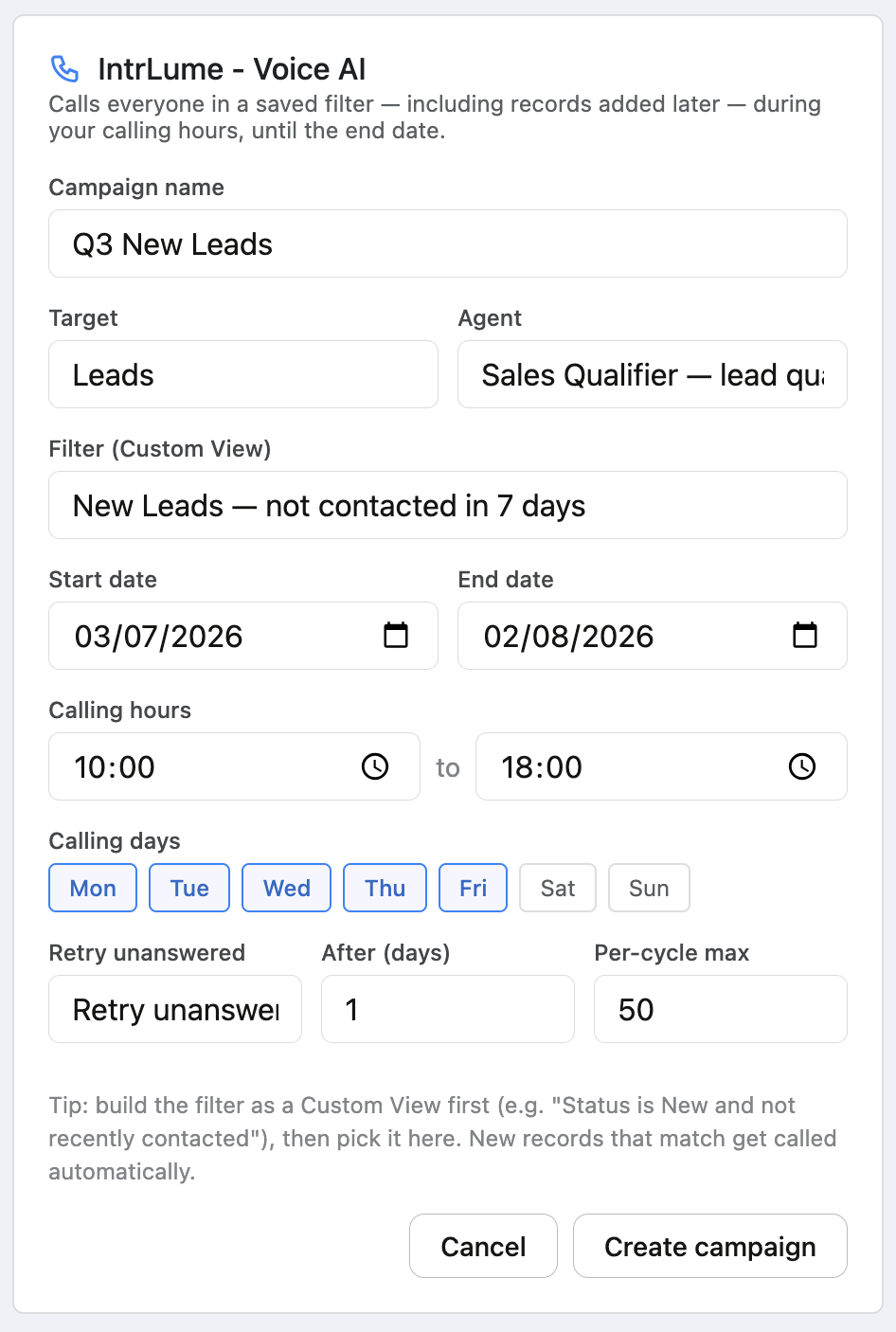
| Field | What it does |
|---|---|
| Campaign name | A label for the run. |
| Target | Leads or Contacts. |
| Filter (Custom View) | The Zoho Custom View whose records get called — this is your audience. |
| Agent | The outbound agent that makes the calls. |
| Start date / End date | The campaign only runs within this window. |
| Calling hours | The hours of day calls may go out. |
| Calling days | The days of week calls may go out. |
| Retry | No retry, or Retry unanswered after a number of days. |
| Per-cycle max | How many records to dial each cycle — your pacing knob. |
Click Create campaign and it starts calling on schedule.
How it keeps going
- It re-checks the Custom View regularly, so new records that match get called automatically — you don't rebuild the list.
- Already-called records are skipped — unless retry is on and they didn't answer, in which case they're re-tried after your chosen number of days.
- Calls only go out within your calling hours and days, in your organization's timezone.
- A large list is worked through over the campaign period. The pace is set by your phone-line capacity, not a single burst.
Build the "who to call" logic into the Custom View itself (status, source, "not recently contacted", and so on). The campaign simply calls whoever the view returns — so a sharper view means a sharper campaign.
A campaign has a Status — Active, Paused, or Completed. Change it on the campaign record to pause or resume; it moves to Completed on its own after the end date.
Capture inbound calls
In the IntrLume settings, turn on Enable inbound lead capture and choose an Inbound agent. IntrLume then turns inbound calls into CRM activity — matching an existing Lead or Contact and adding a note, or creating a new Lead when there's no match — automatically.
What gets written back
After each call, IntrLume writes onto the record:
- The disposition (the outcome), a summary, the recording, and a note with any details the agent captured.
- These also drive a campaign's skip-and-retry logic, so outcomes and follow-ups stay in sync.
Also available
Need to call a hand-picked set instead of a saved view? Select the records in a list and choose Start campaign to run a one-off campaign over just that selection.